Krishna Temple AI Art: Start with a Clear Scene
Ek devotional Krishna temple prompt tab useful hota hai jab usmein depiction, pose, lighting aur composition clear hon. Sirf divine, beautiful aur ultra-detailed keywords repeat karne ke bajaye batayein ki aap painted illustration chahte hain, temple murti ka artistic scene ya greeting-card layout. Is guide mein six copy-ready English prompts aur unhe customize karne ke Hinglish steps hain.
Quick start: neeche Prompt 1 copy karein, image tool mein apne use ke hisaab se square ya vertical layout choose karein aur pehle output mein face, hands, flute aur frame ke margins inspect karein. Decoration baad mein add karein. Yeh prompts creative briefs hain; kisi generator ke tested results, historical temple reconstruction ya guaranteed religious accuracy ka claim nahi karte.
Prompt 1: Peaceful Krishna Temple Courtyard
AI Prompt Box
Create a serene devotional painted illustration of Lord Krishna standing in a quiet temple courtyard. Depict a gentle expression, traditional yellow garments, a restrained gold crown with a single peacock feather, and a simple flute held naturally across the body. Use soft early-morning light, a subtle warm halo and two softly shaded stone pillars. Place a small brass bowl with lotus petals near the foreground and a few clay diyas along the lower edges. Keep the face, hands and flute clearly visible, with balanced proportions and modest ornamentation. Vertical composition with comfortable space above the crown and below the feet. No lettering, logos or watermark-like marks.
Output Example — Prompt 1
Author upload required: add a real output for Prompt 1, describe what is visible, and record the tool and version used.
Tool: Author must supply · Version: Author must supply
How to Use the Base Prompt
AI Prompt Box
Prompt paste karne se pehle decide karein ki final artwork kahan use hoga: phone wallpaper, social post, greeting card ya framed print. Output shape ke available controls tool mein separately choose karein. Kisi aur service ke parameter strings paste karne ke bajaye plain descriptive prompt se start karein. First output mein mood ke saath structural details bhi dekhein; bright colours alone final selection ka reason na banayein.
Agar painting ki jagah murti depiction chahiye toh base prompt ko Prompt 2 se replace karein. Agar Janmashtami greeting banana hai toh Prompt 3 mein reserved text space rakhein aur exact greeting baad mein editor mein add karein. One image mein painting, marble sculpture aur cartoon character ki instructions mix karne se visual direction unclear ho sakti hai.
Har useful version ke saath exact prompt aur chosen output shape save karein. Next attempt mein ek change karein: softer light, fewer flowers ya wider framing. Jab pose, background, palette aur clothing sab ek saath change karte hain, toh samajhna mushkil hota hai ki improvement kis decision se aaya.
Choose the Depiction and Attributes
Is article ke examples yellow garments, peacock feather, flute aur gentle expression ko visual brief ka part banate hain. Inhe har devotional tradition ki complete checklist na samjhein. Agar kisi specific community, artistic style ya familiar shrine ki depiction chahiye, apni intended reference ke hisaab se details verify karein. Reference use karte waqt source aur image permissions ka dhyan rakhein.
Temple murti ke scene mein pedestal, garland aur surrounding architecture describe karein. Painted devotional illustration mein brush texture, palette aur expression describe karein. Narrative scene mein setting aur action choose karein, lekin multiple figures aur complex hand poses ek saath add karne se pehle simple composition settle karein. A familiar visual reference can guide review, but generated details still need inspection.
Prompt 2: Temple Murti with Diyas
AI Prompt Box
Create an artistic depiction of a Krishna murti inside a quiet temple alcove. Show a coherent sculptural form on a simple pedestal, traditional yellow drapery, a delicate flower garland, a peacock-feather crown detail and a clearly shaped flute. Illuminate the scene with soft warm light from a restrained row of diyas below the pedestal. Keep the face and important attributes legible, the background uncluttered and the architectural lines balanced. Use a respectful devotional atmosphere and a consistent sculpture-like finish throughout. Square composition with breathing room around the alcove. No text, logos or depiction of an identifiable real temple.
Output Example — Prompt 2
Author upload required: add a real output for Prompt 2, describe what is visible, and record the tool and version used.
Tool: Author must supply · Version: Author must supply
Prompt 3: Janmashtami Greeting Card Layout
AI Prompt Box
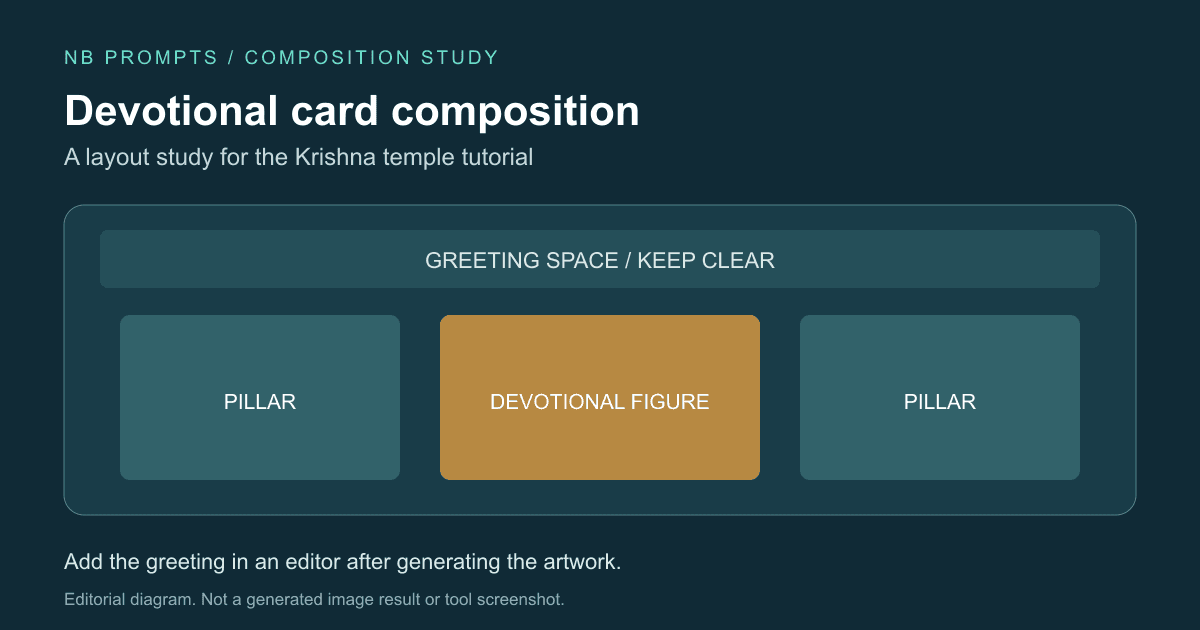
Create a vertical devotional illustration of Lord Krishna for a Janmashtami greeting card. Place the figure in the lower central area, wearing yellow garments with a modest peacock-feather crown and holding a flute in a relaxed, clearly readable pose. Add one marigold garland across the upper side edges and a small row of warm diyas near the bottom. Use a gentle cream and gold palette with soft blue accents. Leave the upper quarter calm and mostly plain so a greeting can be added separately. Preserve space around the crown and hands. No generated lettering, logos or excessive glowing particles.
Output Example — Prompt 3
Author upload required: add a real output for Prompt 3, describe what is visible, and record the tool and version used.
Tool: Author must supply · Version: Author must supply
Prompt 4: Krishna beside a Peaceful River
AI Prompt Box
Create a devotional painted illustration of Lord Krishna beside a peaceful river at dusk. Show a gentle seated pose beneath a broad tree, traditional yellow garments, a modest crown with a peacock feather and a flute resting naturally across the lap. Use a soft blue evening palette, a faint warm glow near the figure and quiet reflections on the water. Keep the face and hands visible and the tree branches simple. Suggest a contemplative atmosphere through open space and restrained detail rather than dramatic effects. Landscape composition with a balanced foreground, no lettering or logos.
Output Example — Prompt 4
Author upload required: add a real output for Prompt 4, describe what is visible, and record the tool and version used.
Tool: Author must supply · Version: Author must supply
Prompt 5: Minimal Watercolour Devotional Artwork
AI Prompt Box
Create a minimal watercolour-style devotional illustration of Lord Krishna against a soft ivory background. Use delicate blue washes for the figure, gentle yellow garments, a small peacock-feather detail and a simple flute held in a relaxed pose. Keep the expression calm, the silhouette coherent and the hands clearly separated from the instrument. Add only a faint suggestion of temple arches behind the figure. Preserve generous negative space, visible paper-like texture and a restrained palette. Vertical art-print composition with no text, logos or dense ornamentation.
Output Example — Prompt 5
Author upload required: add a real output for Prompt 5, describe what is visible, and record the tool and version used.
Tool: Author must supply · Version: Author must supply
Prompt 6: Wide Temple Banner with Text Space
AI Prompt Box
Create a wide devotional illustration featuring Lord Krishna on the right third of a serene temple courtyard. Show yellow garments, a restrained crown with a peacock feather and a clearly shaped flute held across the body. Use soft warm light on the figure and gently shaded pillars behind. Keep the left half mostly plain with a subtle cream-to-gold background for separately added event text. Add a few flowers and diyas near the lower corners without filling the empty area. Preserve a calm expression, clear hand shapes and generous outer margins. No lettering, logos or crowded background figures.
Output Example — Prompt 6
Author upload required: add a real output for Prompt 6, describe what is visible, and record the tool and version used.
Tool: Author must supply · Version: Author must supply
Lighting and Decoration: Keep the Face Readable
Peaceful mood ke liye diffuse light aur restrained highlights se shuru karein. Halo chahiye toh subtle warm halo request karein, phir output mein dekhein ki crown aur face ka outline clear hai ya glow mein merge ho raha hai. Agar image flat lagti hai, ek side se gentle light aur opposite side par soft shadow try karein. Har surface ko glowing banana zaroori nahi.
Festival variation mein ek garland aur limited diyas add karein; pehle existing layout ke empty areas dekhein. Flowers ko face, flute aur hands se door rakhne ka instruction dein. A detailed crown ke saath equally detailed pillars, rangoli aur falling petals add karne se focal point kam clear ho sakta hai. Decoration ko main subject support karne ke liye choose karein.
Ek practical comparison banayein: version A mein simple courtyard, version B mein same composition plus one garland. Dono ko small phone preview mein compare karein. Yeh suggested design exercise hai, measured model test nahi. Jo version expression aur attributes zyada clearly communicate kare, use refine karein.
Fix Hands, Flute, Crown and Temple Geometry
- Hands merge with the flute: simplify the pose and ask for clearly separated hand shapes and an uninterrupted flute outline.
- Crown or feather gets cropped: request more space above the head and slightly wider framing.
- Halo hides the face: reduce halo brightness and retain soft direct light on the facial features.
- Ornaments look tangled: reduce the number of necklaces and use one modest garland.
- Pillars bend or repeat oddly: simplify the scene to two balanced pillars and inspect the perspective.
- Too many petals or lamps: specify a few foreground elements and a quiet background.
Editing controls available hon toh problem area ko revise karein aur baaki composition preserve karne ko kahein. Example instruction: Keep the face, garments, lighting and framing unchanged. Simplify the flute-holding pose, clearly separate the fingers from the instrument and remove extra ornaments near the hands. Output phir manually inspect karein; request likhne se correction guaranteed nahi hoti.
Small preview par hidden errors print mein prominent ho sakte hain. Face ke saath fingers, flute ka continuous shape, crown, jewellery aur visible feet ko zoom karke check karein. Agar repeatedly complex pose fail ho raha hai, resting flute ya simpler hand position choose karein. More detail words add karna structural error ka reliable fix nahi hai.
Add Hindi Greetings and Plan the Crop
Exact Hindi greeting ko editor mein separately type karein. Apni chosen wording ki spelling, matras aur line breaks verify karein, aur agar script padhne mein confidence kam ho toh comfortable reader se proofread karwayein. Decorative lettering ki jagah readable font aur enough contrast choose karein. Text ko face ya detailed jewellery ke upar place karne se bachne ke liye prompt stage par space reserve karein.
Square social image ke liye crown aur hands ko edges se distance dein. Phone wallpaper mein top area clock ke liye uncluttered rakhein. Wide banner mein event details ke liye subject ko side par place karein aur actual destination par crop preview dekhein. Agar text area busy hai, sirf background simplify karein; poora devotional scene regenerate karna har baar zaroori nahi.
Greeting-card design mein upper text space, central figure aur lower decoration ko separately review karein. Ek clear headline aur short message often enough hote hain; extra lines add karne se pehle phone-size readability check karein. Yeh layout choices hain, fixed platform specifications nahi.
Export and Review before Sharing or Printing
Downloaded file ki actual pixel dimensions dekhein. Prompt mein high resolution ya 4K likhne se exact export size confirm nahi hota. Print ke liye printer se final size, bleed, margins aur required file format lein, phir us specification ke hisaab se export karein. One proof at intended size par face, hands, fine ornamentation aur text check karein before ordering multiple copies.
Web use ke liye clear filename choose karein, jaise krishna-temple-devotional-illustration.webp. Alt text mein image mein actually visible scene describe karein, na ki repeated keyword list. Agar artwork ki jagah composition diagram use kar rahe hain toh alt text mein diagram hi batayein. Caption bhi creative context explain kare; generated scene ko actual temple event ki documentary photo na batayein.
Sharing se pehle review karein ki depiction aapke intended audience ke liye appropriate hai aur attributes accidentally distorted nahi hain. Kisi specific ritual, historical event ya real shrine ki accuracy ka claim karna ho toh independently verify karein. Is tutorial ke imaginative temple settings ko generic devotional artwork ke roop mein present karein.
Frequently Asked Questions (FAQs)
Q: Krishna temple AI image ke liye kaunsa prompt use karun? - A: Peaceful painted scene ke liye Prompt 1 use karein. Temple murti ke liye Prompt 2 aur Janmashtami greeting ke liye Prompt 3 choose karein, phir output mein face, hands, flute aur crop inspect karein.
Q: Kya yeh Krishna prompts alag image tools mein use ho sakte hain? - A: Yeh plain-language creative briefs hain. Tool ke supported image-size aur editing controls separately choose karein; different generators identical output nahi denge.
Q: Image ko peaceful aur devotional kaise rakhein? - A: Soft lighting, gentle expression, modest decoration aur quiet background se start karein. Face ko readable rakhein aur excessive glow ya particles reduce karein.
Q: Flute aur fingers galat ban rahe hon toh kya karein? - A: Pose simplify karein, instrument ka clear outline request karein aur available editing controls se affected area revise karein. Corrected output ko zoom karke inspect karein.
Q: Hindi greeting image prompt mein likhni chahiye? - A: Exact wording ke liye blank text area reserve karein aur greeting editor mein separately add karein. Spelling, matras aur line breaks proofread karein.
Q: Kya high-resolution prompt se print-ready file milti hai? - A: Nahi. Actual downloaded dimensions, printer requirements, margins aur a physical proof se suitability check karein. Prompt wording alone print readiness establish nahi karti.
Related Devotional and Realistic Image Prompt Guides
Personal devotional composition ke liye Me With God temple prompt guide dekhein. Broader scene-writing practice ke liye 25 realistic AI image prompts padhein. Is Krishna temple workflow mein pehle depiction aur pose finalize karein, phir lighting, decoration aur export ko refine karein.