Start with one repeated task, not ten subscriptions
Aapko daily work ke liye sabhi 10 AI tools ki zaroorat nahi hai. Pehle ek repeated task choose karein: client email draft karna, public sources se research notes banana, ya approved content ko slides mein convert karna. Ek assistant aur zaroorat ho to ek specialist se start karein. Tools ke beech copying, setup aur output checking bhi working time ka hissa hain.
Is article ke purane version mein daily five-hour saving ka promise tha. Us estimate ke liye verified evidence nahi tha, isliye use hata diya gaya hai. Niche tools ka task-based comparison, review checkpoints aur apna time measure karne ka method diya hai. Kisi tool ka output usable hone tak kitna time laga, wahi aapke liye relevant result hai.
Sirf ChatGPT ke saath planning aur writing seekhni ho to daily ChatGPT workflows dekhein. Yeh guide alag tools ke beech selection aur unki net usefulness measure karne par focus karti hai.
How We Evaluated These Tools
Yeh official product documentation aur plan pages par based editorial assessment hai; hands-on benchmark ya owner ke personal testing ka claim nahi hai. Sources 12 October 2026 ko check kiye gaye. Selection purane article ke same ten products ko retain karti hai; order ranking nahi hai.
Criteria: task fit, required input, review burden, existing workspace mein fit, free access versus paid restrictions, aur usable output tak total cost. Hum star ratings, invented speed scores aur fixed minutes-saved estimates nahi dete. Feature availability account, region, workspace administrator aur plan se change ho sakti hai. Provider documentation features establish karti hai, aapke task par accuracy ya speed prove nahi karti.
Comparison: choose by deliverable
| Tool | Useful deliverable | Main review cost | Access check |
|---|---|---|---|
| ChatGPT | Plan, summary or first draft | Facts, missing context, invented details | Check upload and tool limits |
| Claude | Draft from a supplied brief | Meaning, completeness and factual fidelity | Free and paid usage limits differ |
| Gemini | Draft or work in supported Google apps | File coverage and integration access | Consumer and Workspace access differ |
| Notion AI | Notes inside an existing workspace | Outdated pages and permissions | Free workspace does not mean full AI access |
| Canva AI | Editable visual draft | Text, alignment and brand consistency | Check feature and asset eligibility |
| Gamma | First slide structure | Claims, charts and exported layout | Free credits and paid export features differ |
| Grammarly | Language and tone suggestions | Suggestions that change your meaning | Free and paid features differ |
| Runway | Short generated video asset | Continuity, failed takes and editing | Free credits are a limited starting allowance |
| Perplexity | Source discovery and cited notes | Whether each source supports the claim | Check advanced-search access |
| Midjourney | Concept or illustrative image | Consistency, lettering and usage rights | Subscription plans; do not assume a free tier |
Prices are intentionally linked rather than quoted as universal INR amounts. Country, taxes, billing period and promotions can change the checkout total. A free account, free trial, one-time credits and recurring free allowance are different offers. Before subscribing, confirm the exact feature you need, renewal terms and export restrictions.
Writing and planning: ChatGPT, Claude and Grammarly
ChatGPT aur Claude mein same approved brief use karke draft compare kar sakte hain. Ek ko default rakhein; second subscription tabhi consider karein jab repeatable task mein clear benefit mile. A 150-word client update ke input mein completed work, pending dependency, agreed deadline aur desired tone dein. Output mein unsupported commitments aur invented progress ko manually check karein. ChatGPT supports working with supplied files; uploading a file still requires checking what the answer actually used.
Grammarly ko final language pass ke liye consider karein, especially agar writing already clear hai aur aapko tone ya grammar suggestions chahiye. Har suggestion accept karna useful nahi: a softer sentence may remove a necessary deadline, and a fluent rewrite may change a technical term. Preserve names, amounts, dates and obligations. A short message that takes two minutes manually may take longer to prompt and review.
A general assistant is an alternative to an extra rewriting tool for occasional drafts. Native spellcheck is another option. Choose on recurring correction needs, not the number of AI features advertised.
Research and workspace notes: Perplexity, Gemini and Notion AI
Perplexity web search ke saath cited answers deta hai. Use source discovery ke liye use karein: har important claim ka original page open karein, date dekhein aur supporting passage find karein. Citation ka hona accuracy ki guarantee nahi. Ek pricing comparison mein monthly billing aur annual commitment ko mix kar dena answer ko misleading bana sakta hai even when both links exist.
Gemini ke supported Google-app features existing workflow mein useful ho sakte hain, lekin personal Gemini subscription aur employer ke Workspace permissions ko same na samjhein. Relevant integration apne account mein verify karein. Purane article ka universal two-million-token context claim hata diya gaya hai: file and context limits model, interface and plan dependent hain. A long upload is not proof that every page was considered.
Notion AI tab consider karein jab notes aur team reference pages pehle se Notion mein hain. Approved project notes ko decisions, owner, deadline aur open question mein organize karna ek useful task hai. Old documents aur contradictory notes ko flag karayein; guessed owner assign na karayein. Current pricing distinguishes trial AI capabilities from broader paid AI features. Sirf AI ke liye poori team migrate karne se setup aur permission maintenance ka extra work aa sakta hai.
Visuals and slides: Canva AI, Gamma and Midjourney
Canva AI design aur writing assistance ko editable visual workflow mein combine karta hai. A workshop announcement ke liye approved title, date, venue, audience aur dimensions supply karein. Generated text ko editable text layer mein place karein, then small-screen readability, spelling aur alignment inspect karein. Brand assets aur export options ki eligibility apne plan mein check karein.
Gamma approved notes se presentation ka first structure banane ke liye useful hai. Give one takeaway per slide and mark where a chart needs real data. AI-generated charts ko evidence na samjhein. Export ke baad fonts, overflow, speaker notes aur reading order inspect karein. Free credits are useful for evaluating a first draft; paid access does not remove content review.
Midjourney concept images ya illustrations ke liye consider karein when an image is actually needed. Exact product details, text aur character consistency ko guaranteed na maanein. Subscription tiers and visibility settings matter; commercial use ke liye current terms bhi check karein. Recurring character work ke liye existing character-consistency guide dekhein, including its model-specific caveats. A template or licensed existing asset may be faster than repeated generations.
Video: when Runway belongs in the stack
Runway short generated clips ke liye ek specialist option hai, routine office productivity tool nahi. Pehle shot duration, subject action, camera movement aur starting frame decide karein. Ek simple shot request se start karein, then hands, faces, object continuity aur camera motion review karein. Accepted footage ko editor mein trim, caption aur sequence karna abhi bhi separate work hai.
Purane Gen-3-only framing ko remove kiya gaya hai; current model access plan aur credit cost se check karein. Runway pricing lists one-time free credits, so free access ko unlimited daily video production na samjhein. Failed generations aur unusable footage ko cost log mein include karein. Luma and Runway storyboard workflow shot planning aur editing ke liye relevant next step hai. Real product demonstrations or factual tutorials may need real footage instead of generated scenes.
Five original prompts: input and review checkpoints
Prompts ko relevant tool mein copy karein aur brackets ko apne non-sensitive input se replace karein. Expected deliverable aur review checkpoint har prompt ke saath diya hai. They are working templates, not tested guarantees.
Prompt 1: plan a realistic day (copy-ready)
AI Prompt Box
Act as a planning assistant. Tasks: [task, estimated minutes, deadline, dependency]. Fixed appointments: [times]. Available work hours: [hours]. Group related tasks and leave a buffer. Return a schedule, tasks that will not fit, and questions about uncertain estimates. Do not claim to update my calendar or complete tasks.
Use when an overloaded list needs prioritization. Supply realistic durations; expect a draft schedule and overflow list. Review conflicts and travel or break time before using it.
Output Example — Prompt 1
Author upload required: add a real output for Prompt 1, describe what is visible, and record the tool and version used.
Tool: Author must supply · Version: Author must supply
Prompt 2: draft without inventing commitments (copy-ready)
AI Prompt Box
Draft a client update of at most 150 words using only these facts: [approved facts]. Completed: [items]. Blocked: [items]. Agreed deadline: [date or unknown]. Tone: [tone]. Do not invent progress, promises or reasons. Mark missing facts in brackets. Return the draft and a short list of statements I must confirm.
Use for a recurring status message in ChatGPT or Claude. Expect a concise draft with visible gaps. Check recipients, dates and commitments; send it only after review.
Output Example — Prompt 2
Author upload required: add a real output for Prompt 2, describe what is visible, and record the tool and version used.
Tool: Author must supply · Version: Author must supply
Prompt 3: build a claim-to-source checklist (copy-ready)
AI Prompt Box
Research this narrow question: [question, country, relevant date]. Prefer official primary sources. Return a table with claim, source URL, source date, supporting passage location and uncertainty. Separate sourced facts from your interpretation. If a source cannot be opened or does not establish a claim, say so. Do not fill gaps with guesses.
Use in a search-enabled tool for discovery. Supply scope and time period; expect candidate sources rather than a final verified report. Open the original pages yourself and confirm each supporting passage.
Output Example — Prompt 3
Author upload required: add a real output for Prompt 3, describe what is visible, and record the tool and version used.
Tool: Author must supply · Version: Author must supply
Prompt 4: convert approved notes into slides (copy-ready)
AI Prompt Box
Create a six-slide outline for [audience] from these approved notes: [notes]. Each slide needs a takeaway heading, up to three bullets and a suggested visual. Use only supplied facts and numbers. Mark missing evidence as [source needed]. Include a closing decision or next step. Do not invent charts, quotations or customer results.
Use before layout in Gamma or Canva. Expect a content outline, not finished evidence-backed slides. Check the narrative first, then build and inspect the exported deck.
Output Example — Prompt 4
Author upload required: add a real output for Prompt 4, describe what is visible, and record the tool and version used.
Tool: Author must supply · Version: Author must supply
Prompt 5: extract decisions from notes (copy-ready)
AI Prompt Box
From these notes: [approved notes], extract decisions, action items, named owner, stated deadline and unresolved questions. Quote the supporting sentence for each item. Use unknown for unstated owners or dates. Flag contradictions instead of resolving them by guessing. Return a table and a separate clarification list.
Use with Notion AI or a general assistant when meeting notes need structure. Expect traceable action items. Confirm ambiguous items with the people involved before changing a team task board.
Output Example — Prompt 5
Author upload required: add a real output for Prompt 5, describe what is visible, and record the tool and version used.
Tool: Author must supply · Version: Author must supply
Measure net time saved: a repeatable worksheet
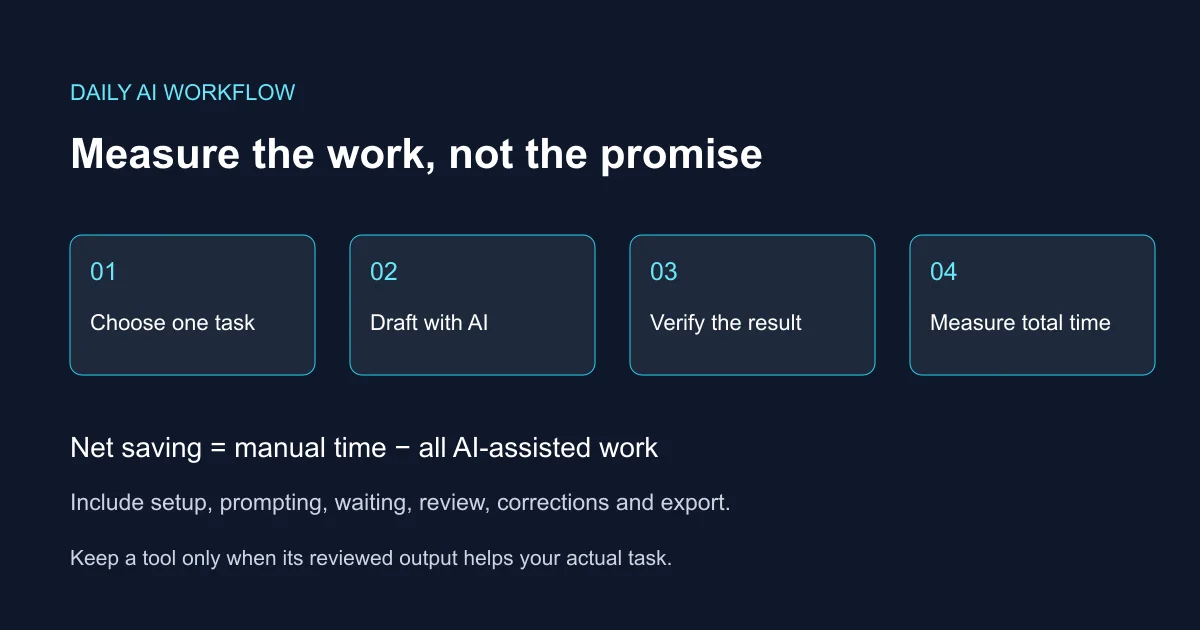
Choose one deliverable you already produce regularly. Record a normal manual run, then several comparable AI-assisted runs. Keep length, difficulty and quality requirements similar. Record prompt/setup time, generation wait, review, corrections and export or transfer time. A polished draft is not done until it passes the same acceptance checks as manual work.
Net saving per task = manual minutes − (setup + prompting + waiting + review + corrections + export minutes). Repeated tasks per week × net saving gives an estimate of weekly benefit. Track one-time setup separately and spread it over the period you expect to use the workflow. Do not add savings from overlapping tasks twice.
Illustrative calculation, not a test result: a manual update takes 25 minutes. With AI, prompting takes 4, waiting 1, review 8, corrections 5 and transfer 2. Total is 20 minutes, so net saving is 5 minutes. Five similar updates would save an estimated 25 minutes that week, not five hours per day. If review instead takes 15 minutes, the workflow is slower than the manual baseline.
| Task and tool | Manual minutes | AI total minutes | Passed quality check? | Net saving |
|---|---|---|---|---|
| Client update / assistant | 25 (example) | 20 (example) | Yes (assumed) | 5 minutes |
Define acceptance before starting: all numbers and dates match the brief; no unsupported claim; intended audience can act on the result; output works in the final format. Log failed attempts too. If errors keep recurring, simplify the input or return to the manual process. Upgrade only when a specific limit blocks a workflow that already proves useful.
A small stack for different working days
Student: one general assistant for planning and explanations, plus original textbooks and official sources for checking. Add slides only when an assignment needs them. Freelancer: one writing assistant and existing document tools; add Canva for regular visual deliverables. Creator: Canva for layouts, then an image or video specialist only for a defined asset requirement. Team: start with the approved workspace and its access controls rather than connecting every account.
Avoid uploading passwords, customer lists, private exam documents or employer-confidential material without authorization. Remove identifying details where possible and check retention, training settings, connected-app permissions and organizational rules. Encryption alone does not establish that an upload is permitted. Keep sending messages, publishing assets and changing task ownership under human review.
Official sources and plan checks
Checked 12 October 2026. These links support product capabilities and access distinctions; the task examples, prompt templates and timing worksheet are editorial guidance. Confirm account-specific features and local pricing before purchase.
Frequently Asked Questions (FAQs)
Q: Kya AI tools daily five hours save kar sakte hain?
A: Is article mein us number ko support karne wala verified benchmark nahi hai. Apne comparable tasks mein setup, checking and correction time include karke net saving measure karein.
A: Is article mein us number ko support karne wala verified benchmark nahi hai. Apne comparable tasks mein setup, checking and correction time include karke net saving measure karein.
Q: Kya mujhe sabhi ten tools use karne chahiye?
A: Nahi. Ek repeated task ke liye ek assistant se start karein. Specialist tab add karein jab aapko aisa deliverable chahiye jo existing tool se efficiently nahi ban raha.
A: Nahi. Ek repeated task ke liye ek assistant se start karein. Specialist tab add karein jab aapko aisa deliverable chahiye jo existing tool se efficiently nahi ban raha.
Q: Kya free plan enough hai?
A: Occasional tasks ke liye ho sakta hai, but feature access and usage limits vary. Trial AI access, one-time credits and recurring free allowances ko alag samjhein.
A: Occasional tasks ke liye ho sakta hai, but feature access and usage limits vary. Trial AI access, one-time credits and recurring free allowances ko alag samjhein.
Q: Citation hone par answer ko trust kar sakte hain?
A: Citation verification ka starting point hai. Original page open karke source date, scope and exact supporting passage confirm karein.
A: Citation verification ka starting point hai. Original page open karke source date, scope and exact supporting passage confirm karein.
Q: Kya paid plan zyada accurate output guarantee karta hai?
A: Nahi. Paid access may offer different models, features or limits, but your output still needs factual and practical review.
A: Nahi. Paid access may offer different models, features or limits, but your output still needs factual and practical review.
Q: Private work documents upload karna safe hai?
A: Blanket assurance nahi di ja sakti. Organization approval, provider policies, retention settings and connected-app access check karein; unnecessary sensitive data remove karein.
A: Blanket assurance nahi di ja sakti. Organization approval, provider policies, retention settings and connected-app access check karein; unnecessary sensitive data remove karein.
Q: Kis point par subscription cancel karna sensible hai?
A: Agar comparable tasks mein correction and setup costs benefits se zyada hain, ya tool rarely use hota hai, simpler workflow consider karein. Renewal and cancellation terms pehle check karein.
A: Agar comparable tasks mein correction and setup costs benefits se zyada hain, ya tool rarely use hota hai, simpler workflow consider karein. Renewal and cancellation terms pehle check karein.