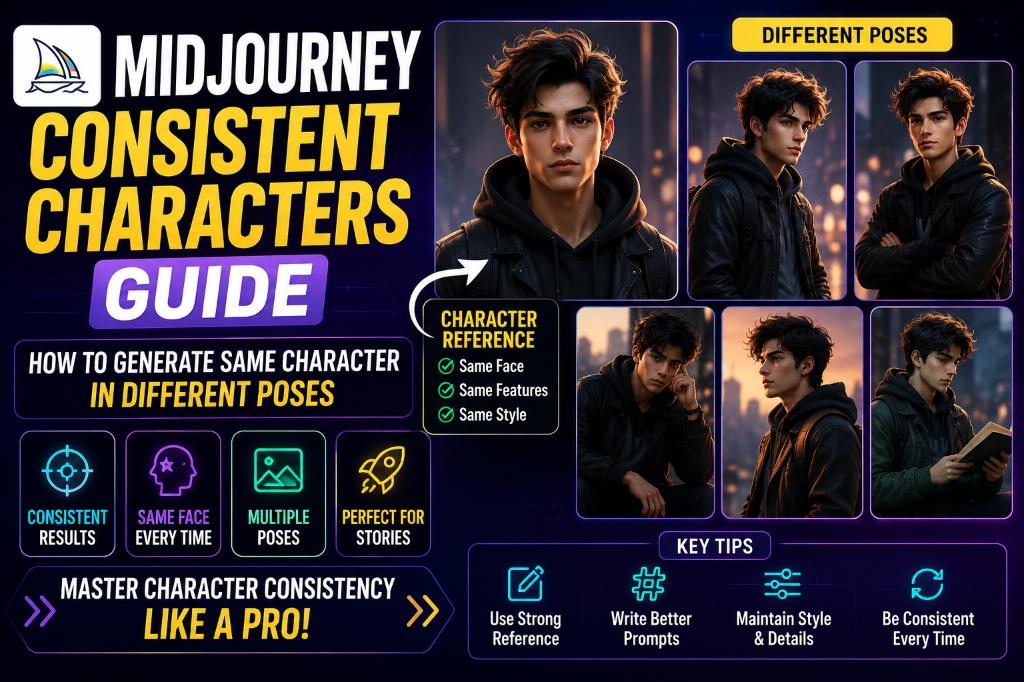
Quick Answer: Midjourney Me Same Character Kaise Banaye?
September 2026 me Midjourney ka default model V8.2 hai. Is version me consistent character banane ka current workflow Edit Model hai: ek clear reference image attach karein, character ki stable visual details text me likhein, aur har new scene me sirf pose, action, camera aur environment change karein. V8.x me purane Character Reference aur V7 Omni Reference ki jagah Edit Model use karna official recommendation hai.
Agar aap specifically V7 chala rahe hain, to ek image ko Omni Reference bana kar Discord me
--oref IMAGE_URL aur zarurat ke hisaab se --ow use karein. V6 ya Niji 6 ke liye legacy syntax --cref IMAGE_URL aur --cw hai. Model aur parameter ko mix na karein—ye sabse common setup mistake hai.Important expectation: reference tools identity aur design ko guide karte hain, pixel-perfect copy guarantee nahi karte. Freckles, logos, jewellery, fingers aur outfit ke tiny patterns drift kar sakte hain. Isliye professional workflow me generation ke baad selection, variation aur local editing bhi hoti hai.
2026 Workflow Comparison: V8.2 vs V7 vs V6
| Model | Use this method | Best for |
|---|---|---|
| V8.2 / V8.x | Edit Model with attached reference image | Current projects and natural-language edits |
| V7 | Omni Reference; Discord: --oref and optional --ow | Legacy V7 workflows involving a person, creature or object |
| V6 / Niji 6 | Character Reference; Discord: --cref and optional --cw | Older saved workflows and compatible anime projects |
New project start kar rahe hain to V8.2 se shuru karein. Purane prompt ko blindly copy karne se pehle uska model check karein. Parameter list me V7 ke liye Omni Reference ne Character Reference ko replace kiya tha, aur V8.x me Edit Model ne dono older reference systems ko replace kar diya.
Step 1: Strong Base Character Reference Banayein
Consistency ki quality reference image se start hoti hai. Ek single, clearly visible character choose karein. Face unobstructed ho, lighting balanced ho aur hairstyle, age range, skin tone, clothing silhouette jaise identity anchors readable hon. Heavy motion blur, sunglasses, extreme shadows, cropped forehead ya group photo avoid karein.
Pehle ek neutral three-quarter ya front portrait generate karna practical hai. Full-body scenes ke liye ek clean full-body reference bhi useful ho sakta hai. V8 Edit Model multiple references accept kar sakta hai, lekin similar identity aur art direction wali images use karein; conflicting references model ko confuse kar sakte hain.
Base portrait prompt:
Character reference portrait of Mira, a 24-year-old Indian woman with an oval face, warm brown skin, almond-shaped dark brown eyes, a small beauty mark below her left eye, shoulder-length wavy black hair with a copper streak, teal bomber jacket over a plain white T-shirt, neutral expression, soft window light, simple gray background, realistic editorial photography, front three-quarter viewStep 2: Character Bible Likhein
Reference image akeli enough nahi hoti. Ek short character bible banayein aur har prompt me core description unchanged rakhein. Isme sirf identifiable, visually observable details hon: approximate age, face shape, skin tone, eye color, hairstyle, one signature feature, body build aur default outfit. Personality words tabhi add karein jab expression ya posture par unka visual effect chahiye.
Mira ke liye reusable identity block:
Mira, a 24-year-old Indian woman, oval face, warm brown skin, almond-shaped dark brown eyes, small beauty mark below her left eye, shoulder-length wavy black hair with one copper streak, slim athletic build. Is exact block ko har scene me copy karein. Synonyms badalne se interpretation bhi badal sakti hai.Do lists maintain karein: locked details jo kabhi nahi badlenge, aur scene variables jaise pose, outfit, location, lighting aur lens. Ye separation prompt ko predictable aur troubleshooting ko fast banata hai.
Step 3: V8.2 Edit Model Workflow
Midjourney website par reference image open ya upload karein, Edit Model me use karein, phir natural-language instruction likhein. Instruction me pehle identity preservation, uske baad desired change specify karein. Example:
Keep the same character identity, facial structure, eye color, beauty mark, hairstyle and copper streak. Show her standing at a metro platform, hands in jacket pockets, full-body composition, cool evening light. Keep the teal jacket unchanged.Ek edit me bahut saare conflicting changes na maangein. Pehle pose aur framing settle karein; next pass me background ya wardrobe refine karein. Agar output identity se door chala jaye, best matching result ko new reference banane ke bajay original approved reference par wapas jaakar instruction simplify karein.
Edit Model ka benefit ye hai ki V8.x me aap plain language se reference-based changes kar sakte hain. Lekin reference ko exact clone samajhna galat hai: output ko face landmarks, hair silhouette, signature mark, body proportions aur costume continuity ke against manually inspect karein.
Reusable Prompt Formula
Har shot ke liye ye order follow karein: identity block + action/pose + outfit + environment + camera/framing + lighting + visual style + aspect ratio. Identity block stable rakhein; baaki slots project ki zarurat ke mutabik change karein.
[IDENTITY BLOCK], [ACTION AND POSE], wearing [OUTFIT], in [ENVIRONMENT], [SHOT TYPE AND CAMERA ANGLE], [LIGHTING], [VISUAL STYLE], [ASPECT RATIO]Prompt me contradictory directions avoid karein, jaise “close-up full-body shot” ya “hard midday light with soft shadowless face.” Short but specific prompt usually ek keyword pile se better control deta hai.
Prompt 1: Full-Body Standing Pose
AI Prompt Box
Keep the exact same character identity and distinctive facial features. Mira, a 24-year-old Indian woman with an oval face, warm brown skin, almond-shaped dark brown eyes, a beauty mark below her left eye, and shoulder-length wavy black hair with one copper streak, standing confidently with her weight on one leg and hands in the pockets of her teal bomber jacket, clean studio background, full-body eye-level fashion photograph, soft directional light, realistic proportions --ar 2:3Full-body output me face chhota hota hai, isliye face detail drift ko 100% zoom par judge karein. Storyboard ke liye acceptable image print campaign ke close crop me acceptable ho, ye zaroori nahi.
Output Example — Prompt 1
Author upload required: add a real output for Prompt 1, describe what is visible, and record the tool and version used.
Tool: Author must supply · Version: Author must supply
Prompt 2: Walking Side Profile
AI Prompt Box
Keep the same character identity, face shape, beauty mark, hairstyle and copper streak. Mira walking across a rainy city crossing, natural mid-stride pose, side profile with her face still visible, teal bomber jacket, dark straight-leg jeans and white sneakers, reflections on wet pavement, medium full shot, 50mm street photography, cinematic blue-hour light --ar 3:2Side profile me nose, jawline aur hairline anchors important hain. Agar likeness weak ho, pure 90-degree profile ke bajay three-quarter profile try karein, phir selected output se stronger side-view reference prepare karein.
Output Example — Prompt 2
Author upload required: add a real output for Prompt 2, describe what is visible, and record the tool and version used.
Tool: Author must supply · Version: Author must supply
Prompt 3: Sitting and Reading
AI Prompt Box
Preserve the same character identity and facial landmarks. Mira sitting naturally in a wooden library chair, one ankle resting over the other, reading an open hardcover book, shoulder-length wavy black hair with a copper streak, cream knit sweater, warm shelves in the background, medium shot, soft afternoon window light, realistic editorial photograph --ar 4:5Outfit change karte waqt identity block intact rakhein aur new clothing ko simple terms me describe karein. Complex logos ya exact typography consistency ke liye generation par depend na karein; final design workflow me manually add karna safer hai.
Output Example — Prompt 3
Author upload required: add a real output for Prompt 3, describe what is visible, and record the tool and version used.
Tool: Author must supply · Version: Author must supply
Prompt 4: Action Pose
AI Prompt Box
Keep Mira's identity unchanged: oval face, warm brown skin, almond-shaped dark brown eyes, beauty mark below the left eye, wavy black hair with a copper streak. She is sprinting on an outdoor athletics track, determined expression, arms and legs in believable running form, teal performance jacket and black running tights, low-angle full-body sports photograph, early morning backlight, crisp subject with subtle background motion --ar 16:9Extreme motion me face aur hands sabse pehle drift karte hain. Pehle moderate action pose generate karein, phir successful frame ko stronger motion ke liye edit karein. Anatomy error ko identity error se alag assess karein.
Output Example — Prompt 4
Author upload required: add a real output for Prompt 4, describe what is visible, and record the tool and version used.
Tool: Author must supply · Version: Author must supply
Prompt 5: Expression Sheet
AI Prompt Box
Character expression reference sheet of the same Mira, identical face, hairstyle, copper streak and beauty mark in every panel, six separate head-and-shoulder portraits showing neutral, joyful, worried, surprised, angry and thoughtful expressions, consistent camera angle and soft studio lighting, plain light-gray background, clean evenly spaced grid, no text --ar 3:2Ek generated grid ko automatically six perfect assets na samjhein. Har panel me eye spacing, mole position, hair part aur jaw shape check karein. Best expressions ko individual crop ya edit pass me refine karna production-friendly approach hai.
Output Example — Prompt 5
Author upload required: add a real output for Prompt 5, describe what is visible, and record the tool and version used.
Tool: Author must supply · Version: Author must supply
Prompt 6: Camera Angles Sheet
AI Prompt Box
Turnaround reference sheet for the same character Mira, consistent identity and proportions, front view, three-quarter view, side view and back view, neutral standing pose, teal bomber jacket, white T-shirt, dark jeans and white sneakers, even studio lighting, plain background, four clearly separated full-body panels, no labels, no text --ar 16:9Turnaround sheet concept art ke liye helpful starting point hai, lekin technical model sheet ki geometric accuracy assume na karein. Back-view details jo original reference me visible nahi hain model invent karega; unhe approve karke character bible me document karein.
Output Example — Prompt 6
Author upload required: add a real output for Prompt 6, describe what is visible, and record the tool and version used.
Tool: Author must supply · Version: Author must supply
V7 Legacy Workflow: --oref and --ow
V7 project continue karne ke liye website me uploaded image ko Omni Reference slot me drag karein. Discord syntax:
Mira waiting at a train station, full-body cinematic photograph --oref https://example.com/mira.jpg --ow 100 --v 7. URL direct supported image file par point karna chahiye.Official docs ke mutabik
--ow range 1–1000 hai aur default 100 hai. High value reference influence badha sakti hai, lekin 400 se upar results unpredictable ho sakte hain unless stylize bhi bahut high ho. Pehle default 100 test karein; ek hi variable ko small increments me change karke compare karein.V7 Omni Reference ek image accept karta hai, text prompt required hai, aur intricate freckles ya clothing logos perfectly match nahi bhi kar sakte. Ye regular V7 generation ke comparison me double GPU time use karta hai aur kuch editing/generation features ke saath incompatible hai; current compatibility ke liye official docs check karein.
V6 and Niji 6 Legacy Workflow: --cref and --cw
Saved V6 workflow me Discord prompt ke end par
--cref IMAGE_URL add karein. Example: Mira standing on a rooftop at sunrise, medium full shot, cinematic realism --cref https://example.com/mira.jpg --cw 100 --v 6.1. Multiple Character Reference URLs space se separate kiye ja sakte hain.--cw 100 default hai aur face, hair aur clothing jaise maximum available details pull karne ki koshish karta hai. --cw 0 mainly face par focus karta hai, isliye outfit change ke liye lower value useful ho sakti hai. Character Reference official docs ke mutabik Midjourney V6 aur Niji 6 ke saath compatible hai.V8.2 prompt me
--cref paste karna current workflow nahi hai. Isi tarah V6 prompt me --oref expect na karein. Purane tutorials follow karte waqt version date aur model flag zaroor dekhein.Style Consistency Identity Se Alag Hai
Same face aur same art style do separate goals hain. Character reference identity/form influence karta hai, jabki Style Reference look and feel ko guide karta hai. Agar comic series bana rahe hain to character reference ke saath stable style description ya supported Style Reference use karein.
Lighting, lens, color palette, line weight aur rendering medium ko bhi style bible me lock karein. Example:
flat editorial illustration, navy and coral palette, clean ink outlines, subtle paper grain. Har prompt me random style artist names jodne se continuity degrade hogi.Realistic portrait prompting ke aur examples ke liye realistic AI image prompt guide dekhein; prompt structure ko Midjourney ke correct reference workflow ke saath adapt karein.
Common Problems and Practical Fixes
Face changes: scene prompt simplify karein, front ya three-quarter face visibility maangein, identity block repeat karein aur clearer source image use karein. Hair or signature mark disappears: us feature ko visual location ke saath text me explicitly mention karein.
Outfit refuses to change: V6 me lower
--cw test karein; V7 me lower Omni weight aur stronger new-outfit description try karein; V8.2 me edit instruction me clearly batayein ki identity preserve karni hai but wardrobe replace karna hai. Character looks pasted into scene: subject aur background ke liye same lighting direction, color temperature aur camera perspective specify karein.Two characters merge: simple composition, distinct positions and distinct clothing use karein—“Mira on the left in teal; Arjun on the right in rust orange.” Complex interaction later pass me add karein. Every rerun changes everything: prompt, aspect ratio and model freeze karke only one variable change karein.
Quality-Control Checklist Before Publishing
Final image ko sirf attractive thumbnail size par approve na karein. 100% view par ye points compare karein: face shape, eye color and spacing, nose and jaw silhouette, skin tone, hair part and length, signature mark position, body proportions, outfit construction, hands, shadows and background interaction.
Series ke liye approved reference, character bible, exact prompt, model version, aspect ratio aur selected output ID ko project sheet me record karein. Har approved image ko A, B ya C score dein: A is publish-ready, B needs local edit, C regenerate. Isse aesthetic preference measurable review process me convert hoti hai.
Character ko real person ya client likeness par base kar rahe hain to permission, intended use and disclosure requirements verify karein. Deceptive impersonation, misleading endorsement aur unauthorized commercial likeness se bachein.
Frequently Asked Questions
Is Midjourney character consistency 100% accurate?
No. References guide generation, exact copying guarantee nahi karte. Tiny facial and clothing details drift kar sakte hain; selection aur editing normal workflow ka part hain.
No. References guide generation, exact copying guarantee nahi karte. Tiny facial and clothing details drift kar sakte hain; selection aur editing normal workflow ka part hain.
V8.2 me --cref use karna chahiye?
No. Current V8.x guidance Edit Model use karne ki hai.
No. Current V8.x guidance Edit Model use karne ki hai.
--cref/--cw V6 and Niji 6 workflow hai; V7 uses --oref/--ow.Kya same seed se same character milega?
Seed experimentation me useful ho sakta hai, lekin identity control ka replacement nahi hai. Current model-appropriate reference tool, stable prompt and manual review use karein.
Seed experimentation me useful ho sakta hai, lekin identity control ka replacement nahi hai. Current model-appropriate reference tool, stable prompt and manual review use karein.
Outfit change karte hue face kaise preserve karein?
Identity features ko locked text block me rakhein aur wardrobe ko separate change instruction banayein. Ek pass me pose, angle, outfit, lighting aur style sab dramatically change na karein.
Identity features ko locked text block me rakhein aur wardrobe ko separate change instruction banayein. Ek pass me pose, angle, outfit, lighting aur style sab dramatically change na karein.
Kitni reference images use karni chahiye?
Tool/version par depend karta hai. V7 Omni Reference ek image leta hai; legacy V6 Character Reference multiple URLs accept karta hai; V8.x Edit Model current reference-based route hai. Similar, approved references choose karein.
Tool/version par depend karta hai. V7 Omni Reference ek image leta hai; legacy V6 Character Reference multiple URLs accept karta hai; V8.x Edit Model current reference-based route hai. Similar, approved references choose karein.
Official Sources and Update Note
This guide was fact-checked and updated on September 2, 2026. Midjourney features change quickly, so production use se pehle current documentation verify karein: Version guide, Edit Model overview, Omni Reference, and Character Reference.
Bottom line: V8.2 me Edit Model se start karein, identity description stable rakhein, ek time par limited variables change karein, aur every output ko continuity checklist se inspect karein. Isi repeatable process se different poses aur scenes me believable character continuity milti hai.