Start with the file you need to submit
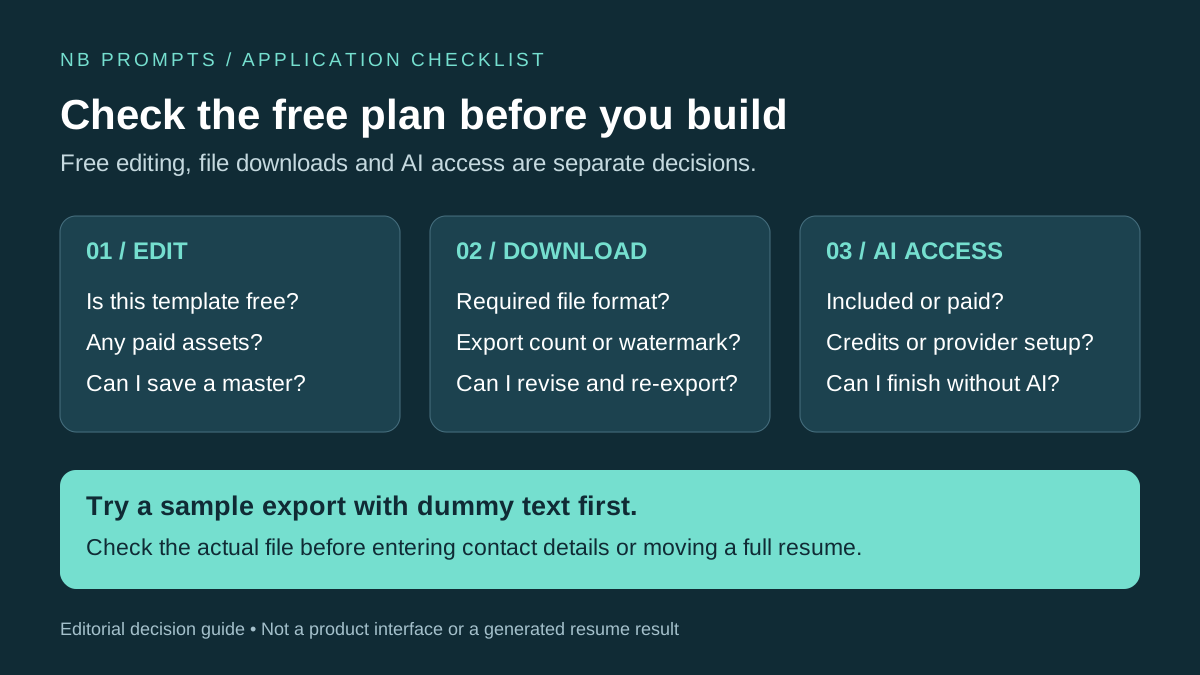
A fresher choosing a resume builder has three different questions: can I edit a resume for free, can I download the finished file for free, and can I use its AI writer without paying? A yes to one does not establish the other two. Check those conditions before spending an evening moving your project details into a template.
This guide keeps five options: Reactive Resume, Kickresume, Rezi, Teal, and Canva. They cover different needs rather than a ranked winner: a free editor, a small template selection, limited export allowances, application tracking, or visual layout work. Start with the employer's requested file type, then choose the simplest tool that can deliver it within your budget.
Resume banana ke baad aapko apni productivity aur skills bhi AI se boost karni chahiye — iske liye hamara Students aur Job Seekers ke liye AI Guide bahut helpful rahega. Aur AI tools ke aur bhi free options ke liye Best Free AI Tools for Students padhein.
How We Evaluated These Tools
This is an editorial comparison of official product documentation and plan pages, checked on October 15, 2026. We compared editing access, export restrictions, AI access, setup effort, and the ability to keep a useful master copy. The recommendations below are judgments about those documented conditions, not scores from accounts we tested or evidence of interview success.
An acceptable choice for a fresher should let you complete the actual application: read the file format requirement, choose a permitted template, check the export allowance, and identify whether AI needs a paid plan or separate provider account. This comparison avoids paid-price quotations because billing periods, currencies, taxes, and offers differ; the linked plan pages are the place to inspect checkout terms.
Compare free editing, exports, and AI separately
Use the table to eliminate unsuitable tools, not to predict which resume an employer will prefer. In particular, a builder's own score is feedback inside that product, not an employer's hiring threshold.
| Builder | Free route | AI boundary | Decision point |
|---|---|---|---|
| Reactive Resume | Free open-source builder; PDF export documented | Provider connection required for AI | Comfortable handling AI setup separately? |
| Kickresume | Four basic resume templates; unlimited downloads | AI writer listed under Premium | Does a basic template meet the requirement? |
| Rezi | One resume; three PDF downloads | Limited free AI access | How many final exports will you need? |
| Teal | Free builder and unlimited resume downloads | Limited AI credits; advanced features are paid | Need job tracking alongside resume versions? |
| Canva | Free templates/assets; PDF export | Plan-based AI allowance | Can you keep the design simple and avoid paid assets? |
1. Reactive Resume: a free editor with separate AI setup
Reactive Resume describes a free, open-source builder with PDF export. Its AI connection guide separates the editor from the AI provider: personal provider connections can incur charges from that provider. An administrator may configure a shared provider on a self-hosted instance. Free software is not the same as free model usage.
Choose it if you want to manage the resume structure independently of an AI subscription. Start with manual text, pick a straightforward layout, and export a sample. If you only need a completed document, provider configuration is unnecessary; it is a poor first choice if your main requirement is ready-to-use AI without setup.
2. Kickresume: basic templates without assuming free AI
The Kickresume pricing comparison lists four basic resume templates and unlimited downloads on Free, with the AI writer under Premium. The earlier version of this guide blurred that distinction. A free template can still be useful when you already have project notes to enter manually.
Use the basic-template route if its layout meets the application instructions. Check that the selected design and features remain in your plan before entering the whole document. Do not choose it on the assumption that the advertised AI writer is included in the standard free tier. No particular underlying model is needed to make that decision.
3. Rezi: plan around the PDF allowance
Rezi's plan page lists one resume and three PDF downloads for Free, alongside limited AI access. Treat the export allowance as a constraint: make substantive edits in your master text before spending an export on each small change. Its own analysis is a revision aid, not a hiring probability.
This route may fit a single application-ready document. It is less suitable if you expect many role-specific versions and repeated PDF exports without paying. Compare the remaining allowance with your actual application plan before investing in its workflow.
4. Teal: a resume builder alongside job tracking
Teal documents a free resume builder with unlimited downloads on its builder page. The plan comparison separates basic features and limited AI credits from paid analysis and matching capabilities. Its help FAQ and pricing materials can describe different trial-credit amounts, so this guide does not promise a fixed credit count.
Consider it when keeping application records and resume versions together matters. Use keyword feedback to locate evidence already in your projects; do not add a skill merely to improve a match score. A free builder is still useful after an AI allowance is exhausted if you can edit the text yourself.
5. Canva: visual control with a simpler application version
Canva's resume-builder page describes free templates and PDF export. Keep the design within free templates and assets. Its current AI usage guidance describes plan-based allowances; access to the editor does not mean unlimited Magic Write usage.
Choose it when you need control over presentation, such as a resume accompanying a portfolio. For an application form, keep a separate plain version with ordinary headings and a readable text order. A decorative layout is not evidence of stronger qualifications. If arranging text boxes becomes the main task, return to a simpler template rather than spending the evening adjusting icons.
A practical workflow for a fresher with a college project
First, make an evidence sheet outside the builder: project goal, your contribution, tools actually used, what works, what remains incomplete, and any result you can explain. Do not begin by asking AI to invent an impressive professional identity. Keep a copy of the relevant job description with the application date so you can trace why a version was tailored.
Second, try an export with dummy text before adding contact details. Confirm the file type, any watermark, remaining download allowance, and whether a paid template or asset was selected. This small check answers a more useful question than a feature list: can this account produce the file you need today?
Third, draft the content and choose headings such as Education, Projects, Experience, and Skills. Put the most relevant evidence where a recruiter can find it. Tailoring means selecting and explaining true details, not repeating every phrase in the vacancy. Save a master text file so changing builders does not require reconstructing your experience.
Fourth, export and review using the checklist below. Then save a named application copy and prepare to discuss the project without reading the resume. For the next stage, our US job-search workflow includes interview and outreach exercises; use the relevant parts for your target market rather than copying US-specific conventions into every application.
Worked example: improve a bullet without inventing an outcome
Consider this fictional teaching brief: a student built a React weather app using a public API; their contribution was the search form, loading state, and error message. There are no recorded users, performance measurements, or deployment results. This is an editing exercise, not a tool output or a claim about a real applicant.
A vague draft is: 'Worked on an innovative weather application.' A more useful version is: 'Built a React weather-search interface that displays API forecasts and handles loading and failed-request states.' The second version identifies the work and its behavior using only the supplied facts. It does not imply a production launch, a user count, or a percentage improvement.
If there is a repository, use its actual title and add a link you control. Add a measure only when you can explain how it was obtained. The original X-Y-Z idea remains useful when you have evidence for the result; without a measurement, describe the action, method, and deliverable instead of filling the gap with a plausible number.
Prompt 1: write evidence-based project bullets
AI Prompt Box
When to use it: You have rough project notes but need concise resume text. Supply your contribution and known limitations. Expect three drafts plus questions about missing evidence, not a finished claim to accept automatically.
Act as a careful resume editor. Using only the facts below, draft three alternative bullets of at most 30 words each for [target role]. Each should state my action, the method or tools, and a supported deliverable or result. Use an X-Y-Z structure only if a measurement is supplied. Do not invent percentages, users, awards, job titles, or team leadership. After each bullet, list the facts used and one clarification question. Facts: [paste redacted project notes]. My contribution: [details]. Measurements actually recorded: [details or none].
Output Example — Prompt 1
Author upload required: add a real output for Prompt 1, describe what is visible, and record the tool and version used.
Tool: Author must supply · Version: Author must supply
Prompt 2: map a vacancy to evidence and gaps
AI Prompt Box
When to use it: You are tailoring the same project for a specific vacancy. Supply the job description and your evidence sheet. Expect a comparison you can check, including requirements you have not demonstrated.
Compare this vacancy with my evidence sheet. Return a table with requirement, supporting fact, evidence location, and status: supported, partly supported, or not demonstrated. Quote the requirement briefly. Suggest edits only for supported facts. Keep missing skills in a separate learning list, outside the resume. Do not turn a class exercise into employment. Vacancy: [paste]. Evidence sheet: [paste redacted facts].
Output Example — Prompt 2
Author upload required: add a real output for Prompt 2, describe what is visible, and record the tool and version used.
Tool: Author must supply · Version: Author must supply
Prompt 3: review extracted resume text before submission
AI Prompt Box
When to use it: You have exported a file and copied its text into a plain editor. Supply the intended section order and extracted text. Expect a list of possible reading-order or evidence problems to investigate; the model cannot reproduce the employer's parser.
Review this extracted resume text. Compare it with the intended section order. Flag merged lines, detached dates, missing headings, repeated claims, and statements that need evidence. Give the exact text and a suggested manual check for each issue. Do not assign an ATS score or predict hiring outcomes. Intended order: [list]. Extracted text: [paste with contact details redacted].
Output Example — Prompt 3
Author upload required: add a real output for Prompt 3, describe what is visible, and record the tool and version used.
Tool: Author must supply · Version: Author must supply
Export checks that a score cannot replace
- Follow the employer's requested file format. A PDF download is not useful if the application explicitly requires another format.
- Open the actual exported file, not just the builder preview. Check line wrapping, page breaks, links, missing characters, and contact details.
- Select text and paste it into a plain editor. If the order is scrambled, simplify the layout. A clean copy-paste result is a diagnostic, not proof that every ATS will parse it identically.
- Inspect the application's populated fields when available. Correct dates, role names, and education that were imported incorrectly.
- Compare each factual statement with your notes. Keep certificates, measurements, and project links available for an interview.
Before using an AI writer, remove identification numbers, full home addresses, private client material, and API keys from the input. Add necessary contact information to the final document yourself. For a broader explanation of AI as a drafting aid, see the university-authored guidance on using AI for resumes and cover letters.
Frequently Asked Questions
Q1: Can a fresher create a usable resume without paying?
A: Yes, the documented free routes in the table can produce a resume, subject to their template and export conditions. The separate question is whether you need paid AI features; manual editing remains an option.
A: Yes, the documented free routes in the table can produce a resume, subject to their template and export conditions. The separate question is whether you need paid AI features; manual editing remains an option.
Q2: Which option should I try first if I do not need AI?
A: Compare a basic Kickresume template with Reactive Resume's editor, then try a dummy-text export. Choose the one that produces the required file with less setup for you.
A: Compare a basic Kickresume template with Reactive Resume's editor, then try a dummy-text export. Choose the one that produces the required file with less setup for you.
Q3: Should I pay for a higher ATS score?
A: First inspect the flagged issue and the actual application requirements. A paid score is not an employer's decision rule. Fix an unreadable document or a missing true detail before considering paid analysis.
A: First inspect the flagged issue and the actual application requirements. A paid score is not an employer's decision rule. Fix an unreadable document or a missing true detail before considering paid analysis.
Q4: What can I write if I have no internship?
A: Use relevant coursework, personal projects, volunteering, or responsibilities you actually held. Label each accurately. A college project belongs under Projects rather than an invented employer.
A: Use relevant coursework, personal projects, volunteering, or responsibilities you actually held. Label each accurately. A college project belongs under Projects rather than an invented employer.
Q5: What if I have no numbers for a project result?
A: Describe the function, your contribution, and the tools. Ask whether a useful measurement exists in your records. Do not add an estimated improvement merely because a bullet-writing formula includes a number.
A: Describe the function, your contribution, and the tools. Ask whether a useful measurement exists in your records. Do not add an estimated improvement merely because a bullet-writing formula includes a number.
Q6: Can I submit the same resume to every role?
A: Keep one evidence-based master, then select the relevant projects and wording for each vacancy. Save each submitted version so you can discuss what the employer actually received.
A: Keep one evidence-based master, then select the relevant projects and wording for each vacancy. Save each submitted version so you can discuss what the employer actually received.
Q7: What should I do when the free export allowance runs out?
A: Check the current plan terms and remaining allowance before paying. Your saved master text lets you move to another suitable editor. A different builder may solve an export constraint without improving the underlying content.
A: Check the current plan terms and remaining allowance before paying. Your saved master text lets you move to another suitable editor. A different builder may solve an export constraint without improving the underlying content.
Choose the smallest workflow that completes the application
Choose a builder for the document it can produce under your account's current conditions. Keep the evidence sheet and master text; treat AI drafts, template choices, and checker feedback as separate editing decisions. Finish when the submitted file is readable, accurate to your experience, and relevant to the vacancy, rather than when a dashboard displays a flattering score.