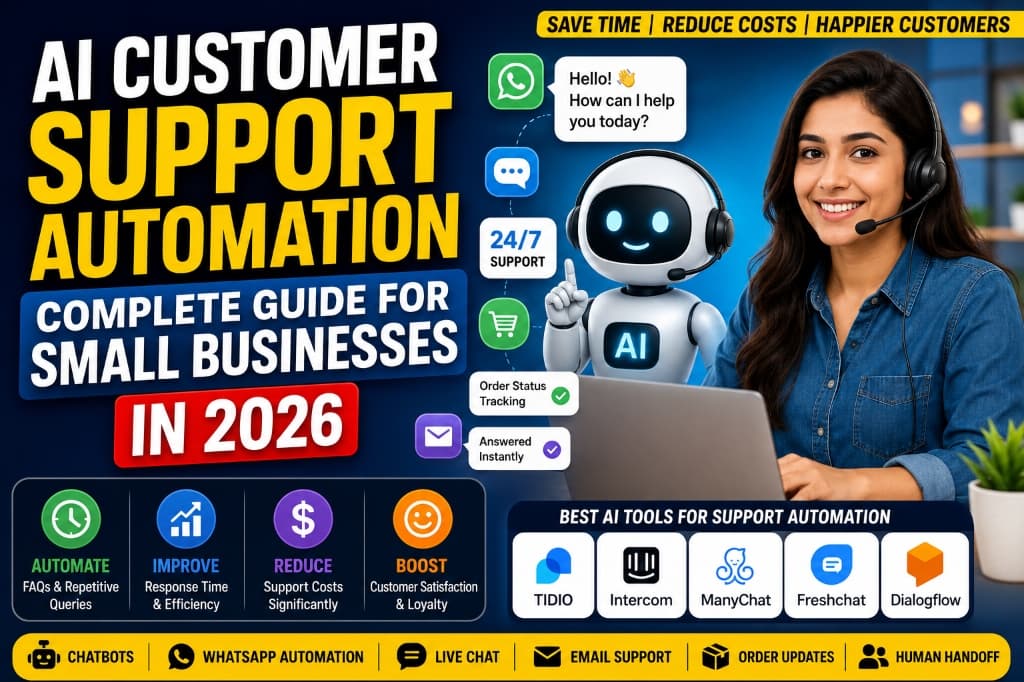
AI Customer Support Automation for Small Businesses in 2026: Tools, Workflows & Examples
In 2026, customers expect near-instant responses across multiple communication channels, including websites, WhatsApp, Instagram, email, and online stores. For small business owners, startup founders, and small support teams, keeping up with these expectations around the clock can be challenging.
This is where AI customer support automation comes in. By setting up automated workflows, businesses can handle common questions, draft responses, send order status updates, and route complex inquiries to human support agents. When done right, automation acts as a helpful assistant that frees up time for tasks requiring human empathy and problem-solving. [Internal Link: Best AI Tools for Small Business Owners]
Disclaimer: AI-generated customer replies should be reviewed regularly. Never use automation to make false promises, share private data, or handle sensitive customer complaints without a human review process.
What Is AI Customer Support Automation?
AI customer support automation uses chatbots, custom AI assistants, automated templates, and software integrations to manage customer interactions. Rather than replacing human agents, AI handles repetitive, straightforward queries so that humans can focus on complex cases.
Here are common customer queries that AI is typically well-suited to handle:
- "Where is my order?"
- "What are your business hours?"
- "Do you offer cash on delivery?"
- "How can I return a product?"
- "What is the price of [Product Name]?"
- "Can I book an appointment for tomorrow?"
- "Do you deliver to my city?"
How AI Customer Support Automation Works
A typical automated customer support process follows these steps:
- Customer sends a message: The query comes in via WhatsApp, website live chat, Instagram, or email.
- AI detects the topic: The system analyzes the text to understand what the customer is asking (e.g., tracking vs. return).
- AI searches data: The chatbot searches your approved FAQs, product catalog, store policies, or shipping data.
- AI drafts/sends a response: The bot replies with the requested information or asks clarifying questions.
- Human handoff: If the issue is complex or sensitive, the conversation is routed to a human team member.
- Continuous improvement: The business reviews chat logs to update FAQs and refine the bot's accuracy.
What Customer Support Tasks Can Be Automated?
Not all tasks should be automated. Repetitive queries are excellent candidates for AI, while sensitive matters require human judgment.
| Task | Can AI Help? | Example | Human Handoff Needed? |
|---|---|---|---|
| Business Hours | Yes | "We are open 9 AM to 6 PM." | Rarely |
| Order Tracking | Yes | Provides tracking link and current status. | If package is lost or delayed |
| Return Policy | Yes | "We accept returns within 14 days." | Rarely |
| Appointment Booking | Yes | Shows calendar slots and registers details. | For custom rescheduling requests |
| Lead Qualification | Yes | Asks for budget, timeline, and contact info. | Yes, to close the sales lead |
| Refund Requests | Partial | Shares refund policy and collects details. | Yes, for final approval and payout |
| Payment Disputes | No | Requires looking into bank transaction histories. | Yes, immediately |
| Angry Complaints | No | Requires human empathy and active resolution. | Yes, immediately |
By separating tasks, you ensure that customers get fast answers to simple questions, while complex problems get the dedicated human attention they deserve.
Benefits of AI Customer Support Automation for Small Businesses
Implementing AI support automation can provide several practical benefits:
- Faster first response: Customers receive replies within seconds, reducing wait times.
- Support outside business hours: AI can handle FAQs and collect leads late at night or on weekends.
- Fewer repetitive replies: AI handles common questions so support staff can focus on high-priority tickets.
- Consistent answers: AI uses approved information, reducing human errors in basic policies.
- Support across channels: Automated systems can run across website chat, WhatsApp, and social media from a single inbox.
Note: Results depend on the quality of your FAQs, product information, setup, and human review.
AI Chatbot vs Human Customer Support
Understanding the differences between automated systems and human agents helps you design a better customer experience.
| Area | AI Chatbot | Human Support Agent |
|---|---|---|
| Speed | Instant (Seconds) | Minutes to Hours |
| Availability | 24/7/365 | Defined working hours |
| Common FAQs | Excellent at answering | Spends unnecessary time repeating them |
| Complex Issues | Limited; needs guidance | Excellent at problem-solving |
| Emotional Complaints | Can sound robotic or unsympathetic | Can show empathy and build rapport |
| Decision-making | Should follow strict rules only | Can apply flexibility and make exceptions |
The best customer support setup uses AI for repetitive questions and preserves human support for complex or sensitive situations. [Internal Link: ChatGPT Team vs Claude Team vs Gemini for Business]
Best AI Customer Support Tools for Small Businesses in 2026
Here is an overview of popular tools businesses use for customer support automation in 2026.
Tidio – Best for Multi-Channel Live Chat
Tidio combines live chat, chatbot automation, and shared inbox features in a user-friendly interface designed for small and medium businesses.
Best features:
- Visual drag-and-drop chatbot builder
- Pre-built customer service and sales templates
- Unified inbox for website chat, email, and social media messages
- AI response assistant to help draft quick replies
Best for: Shopify store owners, service businesses, and agencies looking for an easy-to-use live chat setup.
Example workflow: A visitor lands on a website, asks about shipping fees, and Tidio's chatbot immediately shares the shipping rates page based on the visitor's country.
Things to consider:
- Advanced features are limited on the free tier
- Integrations are primarily focused on e-commerce platforms
Pricing note: Free and paid plans may be available. Check the official website for current pricing, features, integrations, and data policies.
Official Website: https://www.tidio.com
Intercom – Best for Scaling Customer Operations
Intercom offers an advanced customer service platform featuring AI bot assistance, help desk workflows, and proactive support tools.
Best features:
- AI agent (Fin) designed to answer questions from your help center
- Visual, branching workflow builders
- Integrated articles and customer education resources
- Advanced routing and team inbox features
Best for: Growing SaaS startups, service providers, and teams with established help articles.
Example workflow: A user asks how to change their password inside a web application. Intercom's AI bot searches the help center and replies with step-by-step instructions.
Things to consider:
- Can be expensive for very small teams or low budgets
- Requires time to set up and configure help articles properly
Pricing note: Free and paid plans may be available. Check the official website for current pricing, features, integrations, and data policies.
Official Website: https://www.intercom.com
ManyChat – Best for Social Media & WhatsApp Chatbots
ManyChat specializes in automating conversation flows on Instagram DMs, Facebook Messenger, and WhatsApp.
Best features:
- Visual builder optimized for interactive messages
- Triggers based on keywords, comments, or button clicks
- Direct integration with Meta ads for lead capture
- Seamless handoff to a live support inbox
Best for: E-commerce brands, coaches, influencers, and local businesses using Instagram and WhatsApp for sales.
Example workflow: A customer comments 'price' on an Instagram post, triggering ManyChat to send a DM containing the product link and a discount code.
Things to consider:
- Focuses on chat-based social messaging rather than email or website support
- Must comply with Meta's developer policies and messaging windows
Pricing note: Free and paid plans may be available. Check the official website for current pricing, features, integrations, and data policies.
Official Website: https://www.manychat.com
Freshchat – Best for Multi-Channel Support Teams
Freshchat (by Freshworks) offers a customer messaging platform that scales from single agents to large operations, supporting web, mobile, and social channels.
Best features:
- AI-driven conversational bots (Freddy AI)
- Unified agent desktop interface
- Co-browsing features to help guide customers through web pages
- Rich messaging options (cards, quick replies, carousels)
Best for: Small-to-medium teams looking for a reliable, multi-channel customer portal.
Example workflow: A buyer raises a support ticket on the website. Freshchat analyzes the query and suggests relevant knowledge base articles before routing to a support representative.
Things to consider:
- The platform's full potential requires configuring the broader Freshworks suite
- Advanced reporting features are reserved for higher plans
Pricing note: Free and paid plans may be available. Check the official website for current pricing, features, integrations, and data policies.
Official Website: https://www.freshworks.com/freshchat/
Dialogflow – Best for Custom AI & Natural Language Processing
Dialogflow (by Google Cloud) is a development suite for building conversational interfaces for websites, mobile apps, and smart devices.
Best features:
- Advanced Natural Language Understanding (NLU)
- Supports voice and text-based bots
- Multi-lingual support out of the box
- Integrates with Google Cloud services and databases
Best for: Tech-savvy founders, developers, or businesses with specific custom integration needs.
Example workflow: A user asks a complex question with casual phrasing. Dialogflow extracts the intent and pulls the correct pricing details from an external database API.
Things to consider:
- Has a steeper learning curve compared to visual drag-and-drop builders
- Requires technical setup and API configuration
Pricing note: Free and paid plans may be available. Check the official website for current pricing, features, integrations, and data policies.
Official Website: https://cloud.google.com/dialogflow
HubSpot Service Hub – Best for CRM Integration
HubSpot Service Hub integrates ticketing, customer feedback, and live chat within HubSpot's comprehensive CRM platform.
Best features:
- Direct linking of conversations to contact records in CRM
- Automated routing based on account ownership
- Built-in customer satisfaction (CSAT) surveys
- Knowledge base builder that integrates with search engines
Best for: B2B companies, agencies, and businesses already using HubSpot CRM.
Example workflow: An existing client messages the support chat. HubSpot recognizes their email, logs the ticket in the CRM under their company name, and assigns it to their account manager.
Things to consider:
- Costs can rise quickly as contact lists and feature needs grow
- Best suited for teams using HubSpot as their primary CRM
Pricing note: Free and paid plans may be available. Check the official website for current pricing, features, integrations, and data policies.
Official Website: https://www.hubspot.com/products/service
Zendesk – Best for Large-Scale Ticketing & Enterprise Needs
Zendesk is a customer service platform that helps businesses manage customer relationships across phone, chat, email, and social networks.
Best features:
- Powerful ticketing management system
- AI-guided replies and macro automation
- Comprehensive reporting dashboards
- Hundreds of third-party app integrations
Best for: Businesses with dedicated support teams that require advanced ticket routing and tracking.
Example workflow: A customer sends an email complaint. Zendesk turns it into a ticket, applies a category label using AI sentiment analysis, and routes it to the tier-2 support queue.
Things to consider:
- Can feel complex or overwhelming for very small businesses
- Requires onboarding and setup time
Pricing note: Free and paid plans may be available. Check the official website for current pricing, features, integrations, and data policies.
Official Website: https://www.zendesk.com
WhatsApp Business Automation Tools – Best for Chat-Based Markets
These platforms utilize the official WhatsApp Business API to manage customer chats, order alerts, and automated flows.
Best features:
- Green badge verification option for brand authority
- Shared team inboxes for WhatsApp numbers
- Bulk broadcast campaigns to opted-in users
- Interactive quick-reply buttons
Best for: Local shops, D2C brands, service providers, and sellers in WhatsApp-heavy markets.
Example workflow: A user selects 'Track Order' from a WhatsApp menu. The bot prompts them for the order ID, fetches the courier status, and replies directly in the chat.
Things to consider:
- Requires setting up a Meta developer account and obtaining API approval
- Messaging rates apply based on Meta's conversation-based pricing model
Pricing note: Free and paid plans may be available. Check the official website for current pricing, features, integrations, and data policies.
Official Website: https://business.whatsapp.com/
ChatGPT-Based Custom Workflows – Best for Customized AI Assistance
Custom API connections allow businesses to build support bots powered by OpenAI's language models, customized with their business documentation.
Best features:
- Highly flexible and natural-sounding conversational replies
- Can be trained on internal handbooks, guidelines, and manuals
- Able to handle complex phrasing and follow-up questions
- Integrates via custom code or middleware (like Zapier)
Best for: Startups, consultants, and companies with specialized products requiring detailed, tailored explanations.
Example workflow: A client asks a complex configuration question. The custom bot references the company's product documentation API and drafts a step-by-step reply for an agent to review.
Things to consider:
- Requires technical expertise or no-code tool setup to configure
- Needs strict instruction prompt design to prevent the model from generating incorrect info
Pricing note: Free and paid plans may be available. Check the official website for current pricing, features, integrations, and data policies.
Official Website: https://openai.com/api/
Shopify Inbox – Best for E-Commerce Sellers
Shopify Inbox is a free messaging tool that connects Shopify store merchants with buyers through their online storefronts and social media channels.
Best features:
- Native integration with Shopify customer profiles and discount codes
- Automated FAQ replies and quick response buttons
- Displays product details directly inside the chat console
- Free to use for Shopify store merchants
Best for: E-commerce stores running on the Shopify platform.
Example workflow: A shopper clicks the chat button to ask if a shirt is in stock. Shopify Inbox shows the agent the shopper's cart items and stock levels in real time.
Things to consider:
- Works exclusively for Shopify stores
- Has fewer advanced automation features than third-party platforms
Pricing note: Free and paid plans may be available. Check the official website for current pricing, features, integrations, and data policies.
Official Website: https://www.shopify.com/inbox
7 AI Customer Support Workflows You Can Set Up
Here are seven common customer support workflows you can set up to improve your response times and manage queries.
1. Website FAQ Chatbot Workflow
This workflow provides instant answers to standard visitor questions on your storefront.
- Trigger: Customer clicks the chat widget and types a question (e.g., "What is your shipping time?").
- AI Action: The chatbot searches your FAQ database. If a match is found, it delivers the answer: "We deliver within 3-5 business days."
- Handoff: If the bot doesn't find a matching answer, it says: "I couldn't find that answer. Would you like me to connect you to our support team?"
2. WhatsApp Order Status Workflow
Keep customers informed about their deliveries with automated order updates.
- Trigger: Customer sends a WhatsApp message containing the phrase "track order" or "order status."
- AI Action: The bot asks: "Please share your order number." Once the user replies, the bot queries your store database and returns: "Order #1024 has been shipped and is expected by Friday. Tracking link: [URL]".
- Handoff: If the database shows a delivery error, the bot says: "I see a delay with your delivery. Let me connect you with an agent to look into this."
3. Instagram DM Lead Capture Workflow
Capture sales leads directly from comments on your social posts.
- Trigger: A user comments "Price?" on your product post.
- AI Action: The system automatically sends a DM: "Thanks for your interest! The price of [Product] is $49. Would you like to check out the size options?"
- Capture: If the user replies "yes," the bot asks for their name and email with consent, then adds them to your CRM.
- Handoff: If the customer asks a custom customization question, the bot alerts your sales representative to take over.
4. E-Commerce Return Request Workflow
Automate the initial steps of the returns process to save administrative time.
- Trigger: Customer messages: "I want to return my item."
- AI Action: The bot displays your return policy and provides a button selection: "Reason for return? [Wrong Size] [Damaged Item] [Other]". It then collects the order number and photo upload (if damaged).
- Handoff: The collected data is compiled into a support ticket and assigned to an agent to approve the shipping label.
5. Appointment Booking Workflow
Let clients book services without manual back-and-forth messaging.
- Trigger: Customer messages: "I'd like to book a consultation."
- AI Action: The bot displays a calendar widget (like Calendly or TidyCal) showing available time slots.
- Confirmation: Once the customer selects a slot and inputs their details, the system logs the booking, sends a confirmation email, and schedules a reminder.
6. After-Hours Support Workflow
Set realistic customer expectations when your team is offline.
- Trigger: Customer messages your team outside of standard business hours (e.g., Sunday at 10 PM).
- AI Action: The bot replies: "Hi! Our team is offline right now, but we will return on Monday at 9 AM. Here are some quick answers to common questions in the meantime: [FAQ Links]".
- Follow-up: The query is queued in the inbox as an unresolved ticket for the team's morning review.
7. Complaint Escalation Workflow
Ensure serious issues receive immediate attention from a human team member.
- Trigger: Customer messages contain keywords indicating urgency or frustration (e.g., "fraud," "double charged," "never arrived," "angry").
- AI Action: The bot bypasses regular automated FAQ responses.
- Escalation: It replies: "I'm sorry for the trouble. I am routing this directly to our support team right now. An agent will review this shortly." An urgent notification is sent to your support team dashboard.
WhatsApp Customer Support Automation for Small Businesses
WhatsApp is a popular communication channel for many small businesses. When automating WhatsApp support, keep these practices in mind:
- Obtain consent: Ensure customers opt-in to receive automated updates, notifications, and reminders.
- Avoid spam: Only send messages that are useful to the user, such as order updates or requested details.
- Provide clear opt-out options: Give customers an easy way to unsubscribe from automated updates.
- Keep human support available: Always provide a path for the customer to speak with a human.
Here are three sample messages you can adapt for your WhatsApp flows:
Example 1: Welcome Reply
"Hi [Customer Name], thanks for reaching out to [Business Name]! I can help you with product information, shipping rates, returns, or booking requests. How can I assist you today?"Example 2: Order Status Reply
"Please share your order number, and I will check the latest tracking status from our database for you."Example 3: Human Handoff Reply
"I am connecting you with one of our support team members for further assistance. Please share your order number and a brief description of your issue, and we will be right with you."10 Ready-to-Use AI Prompts for Customer Support
These copy-paste prompts are designed to help you generate support templates using AI models (like ChatGPT or Gemini). Customize the bracketed placeholders to match your business details. [Internal Link: ChatGPT Prompts for Small Business Owners]
Prompt 1 – FAQ Response Generator
AI Prompt Box
Use this prompt to turn basic policy notes into customer-friendly responses.
Copy Prompt:
Act as a professional and polite customer support agent. Write a clear, concise response to a customer asking about [Customer Question]. Use the following business policy guidelines to draft your reply: [Insert Policy Details]. Keep the tone [friendly/professional/casual] and keep the message under 3 sentences. Do not make promises outside the provided policy guidelines.Best for: Creating standardized FAQ answers.
How to use: Input your raw policy guidelines and the user's question, then paste this prompt into an AI writer.
Output Example — Prompt 1
Author upload required: add a real output for Prompt 1, describe what is visible, and record the tool and version used.
Tool: Author must supply · Version: Author must supply
Prompt 2 – WhatsApp Customer Reply Writer
AI Prompt Box
Generate short, clear messages optimized for mobile reading.
Copy Prompt:
Act as a customer support assistant for a small business. Draft a short, clear WhatsApp message replying to a customer who is asking [Customer Query]. Use these details: [Product/Policy Details]. Keep the message friendly, professional, and very easy to read on a mobile screen. End with a polite follow-up question. Do not invent any pricing or delivery dates.Best for: Short-form mobile messaging.
How to use: Use this to reply to quick questions on WhatsApp Business.
Output Example — Prompt 2
Author upload required: add a real output for Prompt 2, describe what is visible, and record the tool and version used.
Tool: Author must supply · Version: Author must supply
Prompt 3 – Order-Delay Apology Message
AI Prompt Box
Draft polite apologies for shipping delays.
Copy Prompt:
Write a polite, professional customer support message apologizing for an order delay. The customer's order number is [Order Number] and the new expected delivery date is [New Date]. Acknowledge the delay, apologize for the inconvenience, provide the new date, and offer [Alternative/Discount, if applicable]. Keep the tone sincere and helpful. Do not guarantee an exact hour of delivery.Best for: Handling shipping issues.
How to use: Send this message to affected customers when shipping delays occur.
Output Example — Prompt 3
Author upload required: add a real output for Prompt 3, describe what is visible, and record the tool and version used.
Tool: Author must supply · Version: Author must supply
Prompt 4 – Return-Policy Explanation
AI Prompt Box
Explain return steps clearly to avoid customer confusion.
Copy Prompt:
Write a step-by-step reply explaining how to return a product. The customer's request is [Customer Return Query]. Use these guidelines: [Insert Return Policy, e.g., 14-day limit, original packaging, return address]. Use a clear, numbered list for the steps. Keep the tone helpful and professional. Do not approve a refund decision within this text.Best for: Managing returns.
How to use: Create template replies for return inquiries.
Output Example — Prompt 4
Author upload required: add a real output for Prompt 4, describe what is visible, and record the tool and version used.
Tool: Author must supply · Version: Author must supply
Prompt 5 – Product Recommendation Reply
AI Prompt Box
Recommend matching items based on user preferences.
Copy Prompt:
Act as a helpful sales assistant. A customer is looking for a product that helps with [Customer Need]. Recommend the following item from our catalog: [Product Name & Key Feature]. Explain in 2 sentences why it fits their need based on this description: [Product Details]. Keep the tone warm, friendly, and non-pushy. Ask if they would like a link to view the size or color options.Best for: Social media or live chat sales.
How to use: Guide customers toward matching products.
Output Example — Prompt 5
Author upload required: add a real output for Prompt 5, describe what is visible, and record the tool and version used.
Tool: Author must supply · Version: Author must supply
Prompt 6 – Customer Complaint Response Draft
AI Prompt Box
Acknowledge complaints professionally while routing to human agents.
Copy Prompt:
Draft a customer support reply acknowledging a complaint about [Issue, e.g., broken item, billing error]. Acknowledge the frustration, apologize for the experience, explain that a human agent is reviewing the details right now, and state that we will contact them within [Timeframe, e.g., 2 hours]. Do not make refund promises or admit legal liability. Keep the tone calm, empathetic, and professional.Best for: Handling angry or frustrated customers.
How to use: Use this as a holding message while a human agent reviews the details.
Output Example — Prompt 6
Author upload required: add a real output for Prompt 6, describe what is visible, and record the tool and version used.
Tool: Author must supply · Version: Author must supply
Prompt 7 – Appointment Booking Reply
AI Prompt Box
Help customers book service slots.
Copy Prompt:
Write a short message inviting a client to book an appointment slot. Use this link: [Booking Link]. Explain that they can choose their preferred time from the calendar. Keep the tone polite and casual. Keep the response under 2 sentences.Best for: Consultants, service providers, and coaches.
How to use: Send this to customers asking about availability.
Output Example — Prompt 7
Author upload required: add a real output for Prompt 7, describe what is visible, and record the tool and version used.
Tool: Author must supply · Version: Author must supply
Prompt 8 – Instagram DM Reply
AI Prompt Box
Short replies with call-to-actions for social media users.
Copy Prompt:
Write a short, engaging Instagram DM reply for a customer who asked [Customer Question]. Use these details: [Details]. Keep it friendly, casual, and brief (under 2 sentences). Include a clear call-to-action or link [Link] and one appropriate emoji.Best for: Social media community management.
How to use: Copy and adapt this to respond to comments and DMs.
Output Example — Prompt 8
Author upload required: add a real output for Prompt 8, describe what is visible, and record the tool and version used.
Tool: Author must supply · Version: Author must supply
Prompt 9 – Customer-Support Email Reply
AI Prompt Box
Generate professional email drafts for longer inquiries.
Copy Prompt:
Write a professional customer support email responding to [Customer Query]. Use these business facts: [Business Details]. Include a standard email structure: polite opening, clear answer using bullet points if helpful, action step, and professional closing. Keep the tone helpful and polite. Do not invent any pricing, dates, or company policies.Best for: Email-based customer service tickets.
How to use: Use this template to draft structured email replies.
Output Example — Prompt 9
Author upload required: add a real output for Prompt 9, describe what is visible, and record the tool and version used.
Tool: Author must supply · Version: Author must supply
Prompt 10 – Escalation Summary for Human Support Agent
AI Prompt Box
Summarize conversations for quick agent handoffs.
Copy Prompt:
Read the following conversation transcript: [Insert Transcript]. Write a concise 2-sentence summary for a human support agent who is taking over the chat. Identify: 1) The customer's primary issue, 2) The current state of the request, and 3) Any key details (like order number or product name) they shared. Keep it factual and objective.Best for: Inter-team handoffs.
How to use: Paste a chat transcript to generate a summary for your team members.
Output Example — Prompt 10
Author upload required: add a real output for Prompt 10, describe what is visible, and record the tool and version used.
Tool: Author must supply · Version: Author must supply
How to Build Your First AI Support System
If you are ready to set up automation for your business, here is a checklist to help you get started:
- List your top 20 questions: Identify the most common queries your team receives.
- Write approved answers: Draft clear, accurate answers for each question.
- Choose your channels: Decide where to start (e.g., website chat first, then WhatsApp).
- Select a tool: Choose a platform that fits your budget and integrations (like Tidio or Shopify Inbox).
- Configure human handoff: Ensure there is an easy way for users to request human help.
- Test the flows: Test your setup with test orders and queries.
- Review logs weekly: Check chat transcripts to find questions your bot missed.
- Update FAQs: Refine your bot's answers based on real customer feedback.
- Track response metrics: Monitor average response times and resolution rates.
- Expand gradually: Add more complex integrations only after your basic flows work smoothly.
Customer Data, Privacy and Safety
Protecting customer data is a critical responsibility when using automation. Consider these guidelines:
- Limit data sharing: Avoid uploading unnecessary customer database records to third-party AI platforms.
- Review provider policies: Understand how your chosen AI tool handles, stores, and processes chat data.
- Secure employee access: Manage permissions so only authorized staff can access customer records.
- Avoid payment storage in chat: Never ask for or store credit card details or bank passwords inside chat transcripts.
- Retain human oversight: Do not allow AI to make automated decisions regarding refunds, disputes, or legal matters.
- Get customer consent: Make sure customers agree to receive notifications, especially on mobile channels like WhatsApp.
Common Mistakes to Avoid
To ensure a positive customer experience, avoid these common automation pitfalls:
- Automating everything without human backup: Customers should always have the option to talk to a person.
- Using outdated policy details: Update your bot's FAQs whenever shipping rates, product details, or return policies change.
- Allowing the AI to invent details: Ensure your prompts restrict the bot from guessing prices or delivery times.
- Sending unsolicited messages: Keep automated notifications relevant to the customer's request.
- Responding to serious complaints with template bots: Escalate anger or billing issues to a human agent immediately.
- Neglecting testing: Test all conversational paths before making your bot live to the public.
Frequently Asked Questions
1. What is AI customer support automation?
AI customer support automation uses chatbots, software integrations, and AI models to handle common customer questions (like business hours or shipping updates) and route complex queries to human agents.
AI customer support automation uses chatbots, software integrations, and AI models to handle common customer questions (like business hours or shipping updates) and route complex queries to human agents.
2. Can small businesses use AI chatbots?
Yes. Many tools (like Tidio or Shopify Inbox) offer affordable or free starter tiers suitable for small businesses, making setup possible without a developer team.
Yes. Many tools (like Tidio or Shopify Inbox) offer affordable or free starter tiers suitable for small businesses, making setup possible without a developer team.
3. Can AI reply to WhatsApp customer messages?
Yes. By utilizing the official WhatsApp Business API through platforms like ManyChat, businesses can automate FAQs, order status replies, and welcome greetings.
Yes. By utilizing the official WhatsApp Business API through platforms like ManyChat, businesses can automate FAQs, order status replies, and welcome greetings.
4. Can AI track customer orders?
Yes. Automated tools can integrate with e-commerce platforms (like Shopify) to fetch shipping details and provide tracking status when a customer enters their order number.
Yes. Automated tools can integrate with e-commerce platforms (like Shopify) to fetch shipping details and provide tracking status when a customer enters their order number.
5. Which AI tool is best for customer support?
The best tool depends on your platform: Shopify Inbox is convenient for Shopify sellers, ManyChat is suited for WhatsApp and Instagram, Tidio is versatile for websites, and HubSpot integrates well with CRM databases.
The best tool depends on your platform: Shopify Inbox is convenient for Shopify sellers, ManyChat is suited for WhatsApp and Instagram, Tidio is versatile for websites, and HubSpot integrates well with CRM databases.
6. Can AI replace human customer-support agents?
No. AI is designed to handle simple, repetitive queries, but human agents are essential for resolving complex, emotional, or sensitive customer complaints.
No. AI is designed to handle simple, repetitive queries, but human agents are essential for resolving complex, emotional, or sensitive customer complaints.
7. Is AI customer support safe for business data?
It can be if you choose reliable providers, review data policies, and avoid uploading sensitive customer information. Check your tool's privacy settings before launch.
It can be if you choose reliable providers, review data policies, and avoid uploading sensitive customer information. Check your tool's privacy settings before launch.
8. Can AI help e-commerce sellers with returns and refunds?
AI can guide customers through your return policies, collect order details, and request photos, but a human agent should make the final refund decision.
AI can guide customers through your return policies, collect order details, and request photos, but a human agent should make the final refund decision.
9. How much does AI customer support automation cost?
Costs range from free plans (for basic tools) to $15–$50 per month for starter plans, scaling higher for advanced enterprise platforms. Check official websites for current details.
Costs range from free plans (for basic tools) to $15–$50 per month for starter plans, scaling higher for advanced enterprise platforms. Check official websites for current details.
10. How do I start AI automation for my small business?
Start by listing your top 10–20 customer questions, write clear answers, choose an entry-level chat tool, set up a human handoff workflow, and test it before launch.
Start by listing your top 10–20 customer questions, write clear answers, choose an entry-level chat tool, set up a human handoff workflow, and test it before launch.
Conclusion
AI customer support automation offers small businesses a practical way to manage repetitive questions, speed up response times, and keep support active outside business hours.
However, the key to a good customer experience is balance. Combining automated FAQs with an easy, clear path to a human support agent ensures customers get fast answers to simple questions, and personal care for complex ones.
Start by listing your most common questions, choose a tool that fits your current channels, and refine your setup over time based on real conversations.
Explore more free AI prompts, business tools, e-commerce resources and customer-support guides on newbananaprompts.in.
Related Articles
Build a more efficient business workflow with these guides:
- Compare popular AI platforms with ChatGPT Team vs Claude Team vs Gemini for Business.
- Discover helper tools with Best AI Tools for Small Business Owners in 2026.
- Boost your store flows with Best AI Marketing Tools for Small Businesses in 2026.
- Generate visuals with 30 AI Image Prompts for Product Photography in 2026.
- Refine your prompts with ChatGPT Prompts for Small Business Owners.
For engineering teams building internal tools or support automation, the best AI coding tools for developers guide can help choose coding assistants and agents for faster implementation.